
Rendr Magento Extension
Overview
The Rendr Magento Extension allows you to display Rendr delivery options directly in your Magento checkout and return live delivery pricing based on parcel dimensions.
Through this extension, your customers can select Rendr delivery services during checkout, and delivery requests are created in Rendr after the order is placed.
This integration helps merchants:
- Display live Rendr delivery rates at cart and checkout
- Offer Fast, Same Day and Standard delivery options
- Calculate pricing using parcel dimensions
- Sync delivery status updates back into Magento
After the integration is connected:
- Magento requests delivery rates from Rendr
- Rendr returns available services and pricing
- Orders placed with Rendr create delivery requests in Rendr
- Tracking updates sync back into the Magento admin
How it works
The Magento extension connects Magento’s shipping system to Rendr’s Delivery API.
- Magento sends parcel and address details to Rendr.
- Rendr returns live delivery rates at cart and checkout.
- The customer selects a Rendr delivery option.
- After checkout, a delivery request is created in Rendr.
- Staff manage the delivery booking.
- Tracking events update back into Magento automatically.
Check out the Rendr delivery services available.
What you’ll need
- A Magento 2 store. This extension is compatible with:
- Magento 2.2.x
- Magento 2.3.x
- Magento 2.4.x
- Admin access to Magento
- Your Rendr credentials, provided by Rendr Onboarding & Integration team:
- Client ID
- Client Secret
- Tenant ID
- Store ID
- Default parcel dimensions (if not set at product level)
If you are not using a Magento 2 store, or you have a custom Magento implementation, we recommend integrating with Rendr via the Rendr API.
See the full Rendr API documentation: API Reference.
Installation
About the extension
Frontend
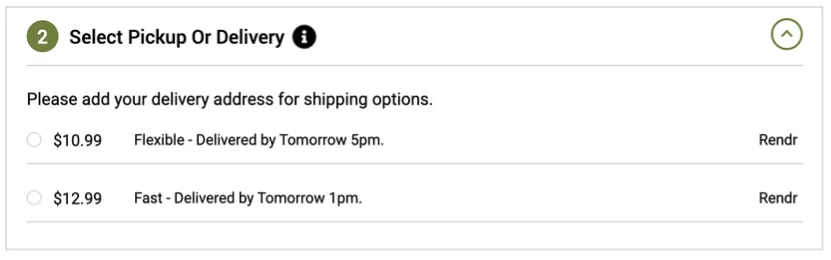
- Customers can get current rates for goods shipped within Australia, based on height, width and length.
- Rates can be returned at cart and checkout.
- Rates returned are based on your Rendr account configuration and include Rendr Fast (30 minutes – 3 hours), Rendr Flexible (Same Day) and Rendr Standard (Overnight / Interstate).
- The extension works alongside all default Magento 2 shipping methods.
Backend
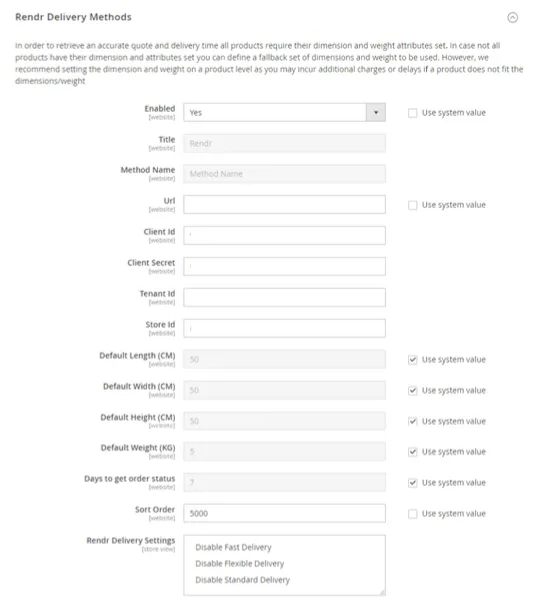
- Enable or disable the extension with a single Yes / No dropdown.
- Define your own custom shipping title.
- Configure the Auth URL, API Key, Tenant ID, Store Handle, and default Height, Length and Width (in cm).
- Switch between Sandbox and Production mode to test and display rates on the frontend.
- Define the number of days to sync delivery status from Rendr to Magento.
- Exclude specific products from being offered Rendr delivery.
- Disable specific Rendr shipping method options.
Technical specifications
- A delivery request is created in Rendr after an order is placed, using the required order data through Rendr’s Delivery API.
- Staff members then need to manage the booking of the delivery.
- The extension stores shipping details in a separate table, which is displayed in the Magento admin panel.
- The extension only works with online payment methods. It does not support offline methods such as Bank Transfer or Cash on Delivery (COD).
- Tracking events update the Magento backend as delivery statuses update in Rendr’s API.
Support and troubleshooting
Contact us
If you need assistance, contact Rendr Support.
Common issues
Rendr rates do not appear at checkout
Cause: The extension is disabled or the credentials are incorrect.
Resolution:
- Confirm Enabled is set to Yes.
- Re-check the API Key, Tenant ID and Store Handle.
- Confirm the correct environment mode (Sandbox or Production) is selected.
No rates returned for some products
Cause: Product dimensions are missing.
Resolution:
- Set height, length, width and weight at product level.
- Or configure default parcel dimensions in the extension settings.
Incorrect delivery options shown
Cause: Rendr delivery methods have been enabled or disabled incorrectly.
Resolution:
- Review which Rendr services are enabled or disabled.
- Save the configuration and flush the Magento cache.